Why You Keep Checking Your Phone (And the 4-Window Reset That Stops It)
What you’ll learn:
- Why checking your phone feels automatic, not optional
- The real cost is hidden in “just a quick look.”
- A 10-minute setup that cuts checking by 60-80% in one week
- What to expect on Days 4-5 when old habits fight back
It’s 2:47 PM. You’re writing a report.
Your phone lights up on the desk.
You glance. It’s just a calendar reminder.
But your hand reaches anyway.
You unlock the screen.
WhatsApp is open, three unread chats.
You scroll. You reply to one.
You check if your earlier message was read.
Email. Teams. Back to WhatsApp.
Then back to the report.
Twelve minutes gone. Your thought is lost.
You tell yourself: “This is the last time. I’ll focus now.”
Ten minutes later, your hand reaches again.
If you’ve been trying to stop checking your phone at work but keep failing, you’re not alone.
This compulsive smartphone behavior affects millions of knowledge workers. And you’re not undisciplined.
You are not alone:
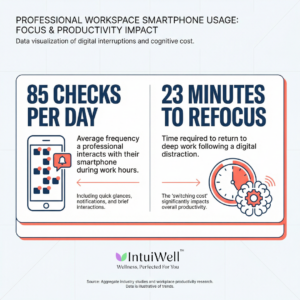
- The average person checks their phone 85 times per day
- Takes 23 minutes to refocus after each check
- By evening: exhausted but behind on work
- The pattern feels automatic, not chosen
The Real Problem
You are not undisciplined. You are not lazy. You are not addicted.
You are responding to a pattern your brain learned.
Here’s what’s actually happening:
Your brain treats every phone check like a lottery ticket. Sometimes you get an urgent client message. Sometimes a harmless meme. Sometimes nothing.
You cannot predict which.
So your brain says: “Check again. You might miss something important.”
This is the same mechanism that makes slot machines hard to walk away from.
Researchers call it a variable reward schedule—unpredictable payoffs keep you checking.
The problem is not your phone.
The problem is that work lives on your phone now.
You cannot ignore it completely. A client might actually need you. Your manager might send something urgent.
So you check. And check. And check.
Research from the University of California found that the average person checks their phone 85 times a day.
That is once every 11 waking minutes.
Most checks feel automatic. You unlock your phone without deciding to.
The Hidden Cost of “Just a Quick Look”
Here is what happens when you check mid-task:
You stop writing the report. You read a message.
You come back to the report. But your brain is still thinking about the message.
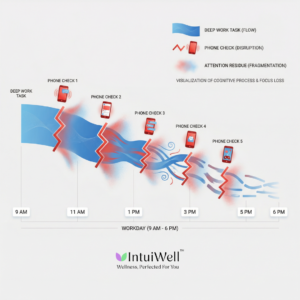
Researchers have a name for this: attention residue.
Think of it like this: your brain is a whiteboard. When you switch tasks, you don’t fully erase the previous task. Pieces of it stay behind, taking up space.
A study tracked office workers and found it takes 23 minutes to fully return to the original task after an interruption.
So when you “just quickly check” five times in an hour, you never actually return to full focus.
Your workday becomes:
Start task → check phone → lose thought → restart task → check phone → lose thought → restart task
By 6 PM, you are exhausted but behind.
Not because you are slow.Because you restarted the same task eight times.
Why “Just Turn Off Notifications” Doesn’t Work
You have probably tried this already.
You turned off notifications. You put the phone face-down. You moved it to another room.
It worked for two hours. Maybe two days. Then you checked anyway.
Here is why:
Turning off notifications does not remove the uncertainty.
Your brain still wonders: “What if something urgent came in?”
That wondering creates low-level anxiety. The anxiety builds. Eventually, you check to relieve it. Then the cycle starts again.
App timers do not work either. They tell you how much you are checking, but they do not tell you when to check instead.
You need a system that gives your brain predictable access without constant wondering.
Digital distraction is now the #1 focus killer in modern workplaces—but it’s solvable with the right system.
The 4-Window Checking System
The system in one sentence: Check your phone at four pre-scheduled times during work hours, keep it out of sight between those times, and track extra checks for seven days to break the automatic reaching pattern.
This system works because it does two things your brain needs:
- It tells your brain when checking will happen (removes the wondering)
- It proves that nothing critical gets missed (removes the fear)
You will check your phone four times during work hours.
Not zero times. Not whenever you feel like it. Four scheduled times.
Your brain learns: “I do not need to check now. Checking happens at 12:30.”
The anxiety drops.
The urge weakens.
Takes 10 minutes to set up. Works in one week.
How Standard Solutions Compare
Before we dive into implementation, here’s why other approaches fail:
| Solution | What It Does | Why It Fails | Success Rate |
| App timers | Shows how much you check | Doesn’t tell you when to check instead | Low |
| Turn off notifications | Blocks alerts | Creates anxiety about missing urgent messages | Low |
| Willpower alone | Depends on self-control | Runs out by mid-afternoon during stressful days | Very Low |
| “Digital detox” | Complete phone removal | Not realistic for work; no transferable system | Very Low |
| 4-Window System | Scheduled checking + tracking | Removes uncertainty AND provides structure | High |
The 4-Window approach is different because it works with your brain’s need for certainty, not against it.
Why 4? It’s the magical number for short-term memory.
How to Set It Up Tonight
Step 1: See Your Current Pattern (3 minutes)
Open your phone settings:
• iPhone: Settings → Screen Time → See All Activity
• Android: Settings → Digital Wellbeing → Dashboard
Write down three things:
- How many times did you pick up your phone yesterday
- Your top 3 apps by time
- When you use your phone most (morning, afternoon, evening)
Example:
• 82 pickups
• WhatsApp (2 hours), Gmail (51 minutes), Teams (38 minutes)
• Peak times: 10 AM–12 PM, 3–5 PM
You are not looking at this to feel bad. You are looking at this to see the pattern.
Most people are shocked. “I thought it was maybe 20 times, not 82.”
That is normal. The checking feels invisible because it is automatic.
Step 2: Pick Your 4 Check Times (4 minutes)
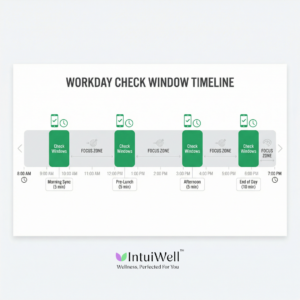
Choose four times during your workday when you will check everything—WhatsApp, email, Teams, Slack, all of it.
Example schedule:
| Window | Time | Duration | Purpose |
| Morning sync | 9:30 AM | 5 min | Overnight messages, priority items |
| Pre-lunch check | 12:30 PM | 5 min | Mid-morning follow-ups |
| Afternoon update | 3:30 PM | 5 min | Client/team responses |
| End-of-day sweep | 6:00 PM | 10 min | Close open loops, plan next day |
Adjust these to match your work rhythm. If you have a 10 AM meeting daily, move the first check to 10:30 AM.
The rule: Outside these four times, your phone stays in a drawer, bag, or another room. Not on your desk. Not face-down next to you.
Why?
A study found that having your phone on the desk—even powered off, face down—reduces your ability to focus.
Your brain uses energy to monitor it. The energy you need for your actual work.
Step 3: Create Your “Emergency Only” Rule (2 minutes)
You need one exception, or you will panic and abandon the system.
Write down your bypass rule:
“I will check outside my four times ONLY if I am waiting for [specific person] about [specific topic] before [specific time].”
Good examples:
• “Waiting for Sara’s approval on the client proposal before my 3 PM call.”
• “Waiting for legal team’s contract feedback before 5 PM deadline.”
Bad examples:
• “My manager might need me.”
• “Something urgent might come up.”
• “Just in case.”
If it is vague, it does not count.
Most days, you will not use your bypass. But knowing it exists helps you trust the system.
Step 4: Set One Phone Barrier (1 minute)
Pick one action tonight:
Option A: Turn off all work app notifications except phone calls
Option B: Move WhatsApp and Teams to your phone’s last screen (forces you to swipe multiple times—breaks the automatic reach)
Option C: Use Focus Mode (iPhone) or Do Not Disturb (Android) to block apps except during your four check times
You only need one barrier. Not all three.
The goal is not to make checking impossible.
The goal is to make checking a choice, not a reflex.
Track This for 7 Days
Every night before bed, write down one number:
How many times did I check outside my four scheduled times?
Do not count:
• Your four scheduled checks
• Using your emergency bypass (if you met all three criteria)
• Actual phone calls
What to expect:
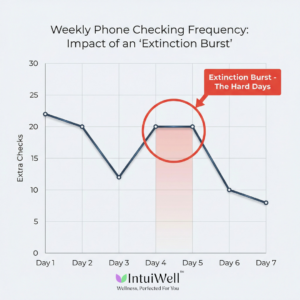
| Day | What Happens | Extra Checks (typical) |
| 1-2 | High awareness. You catch yourself reaching and stop. | 20-25 |
| 3 | First big drop. The system feels easier. | 12-15 |
| 4-5 | The hard days. Old urges come back strong. | 18-22 |
| 6-7 | New pattern settles. Checking feels optional again. | 8-12 |
Days 4-5 are critical.
This is when most people think: “This is not working anymore. I should just check normally.”
Do not trust that thought.
What is actually happening: your brain is testing if the old habit still works. This is called an extinction burst in psychology.
Think of it like a toddler’s tantrum. When you stop giving in to demands, the tantrum gets worse before it stops.
Your urge to check works the same way.
If you push through Days 4-5, the urge drops significantly on Day 6.
If you give in on Day 4, you start over.
Why This Works When Other Things Do Not
App timers tell you how many times you check. They do not tell you when to check instead.
Turning off notifications creates anxiety about missing something. Anxiety makes you check more.
“Just use willpower” fails because willpower runs out by 3 PM after a hard morning.
The 4-Window System works because:
- Your brain knows when checking happens (removes wondering)
- Nothing urgent gets missed (removes fear)
- You are not fighting urges all day (saves mental energy)
- The pattern becomes automatic in one week (no lifelong effort needed)
One study tested this exact approach: people who batched their phone checks at fixed times reported 23% less stressand finished more tasks than people who responded to every notification.
They did not miss urgent messages.
They just stopped being interrupted by non-urgent ones.
This approach to managing phone addiction at work is backed by behavioral psychology research on habit formation and attention management.
When to Get Support
This system works for most people.
But if you are still checking 20+ times outside your windows after Day 7, you might need structured help.
Signs you need more than self-tracking:
- You feel anxious when your phone is in another room for 30+ minutes
• You check even when you know nothing new will be there
• Checking is happening outside work hours and affecting relationships or sleep
• You have tried this system twice, and it did not stick
The IntuiWell Personal Growth Program is designed for this.
You get:
• Weekly check-ins to adjust your check times to your actual work rhythm
• Help rebuild the mental boundary between “work time” and “my time.”
• Support through Days 4-5 when old habits fight back hardest
• Tracking that catches patterns you cannot see yourself
This is not coaching where someone gives advice and disappears.
This is systematic behavior change with someone checking your progress weekly.
If you do not need it, I will tell you directly. No upselling.
What Happens If You Do Nothing
If you keep checking the way you do now, here is what the next six months look like:
- You will finish fewer tasks per day
• You will stay late to catch up on work you could not focus on earlier
• You will feel mentally exhausted by evening, even on “light” days
• You will lose your ability to think deeply about hard problems
• You will start dreading work that requires sustained focus
• Your patience at home will drop because your brain never rests
This does not get better on its own.
Phones are not going away. Work messages are not decreasing.
You need a system.
What Changes When You Start
After one week of the 4-Window System, here is what people report:
- “I finished a report in one sitting for the first time in months.”
• “I did not realize how tired constant checking made me until I stopped.”
• “My team still gets my replies. They just get them at 12:30, 3:30, or 6:00 instead of instantly.”
• “I can think again without my brain jumping to check my phone.”
• “I stopped working until 8 PM because I actually finish during work hours now.”
You will not fix your entire job in 10 minutes.
But you will fix your attention.
And attention is where everything else starts.
Start Tonight
Step 1: Check your screen time (3 min)
Step 2: Pick your 4 check times and put them in your calendar with alerts (4 min)
Step 3: Write your emergency bypass rule (2 min)
Step 4: Set one phone barrier—move apps, turn off notifications, or use Focus Mode (1 min)
Tonight, before bed: Write down how many times you checked outside your four windows.
Do this for seven days.
If it works, you have a system.
If it does not stick after Day 7, book a call.
Author
Vallabh Chitnis Co-Founder, IntuiWell | Mindset & Growth Strategist
Vallabh spent 20+ years leading product and operations teams in tech before shifting focus to helping high-performers build practical systems for focus, decision-making, and stress management in high-demand environments.
Important Note
If phone checking is affecting your work, relationships, or sleep for more than two weeks, talk to a mental health professional. This might be connected to anxiety, ADHD, or other conditions that need proper assessment.
This article is for education. It is not medical or mental health treatment.
Questions People Ask
1. Who is this for?
People who check their phones constantly during work cannot focus on one task without interruption.
2. What is actually causing this?
Your brain learned that checking sometimes gives you important information. Since you cannot predict when, it tells you to check constantly “just in case.”
3. When does it get worse?
During deadlines, client escalations, team conflicts, waiting for important replies, performance reviews, and organizational changes.
4. Where does the checking happen most?
Mid-task, when you are trying to focus. During meetings. While reading emails or documents. During any moment of transition or boredom.
5. Why does turning off notifications not work?
Because it does not remove the uncertainty. Your brain still wonders if something came in. That wondering creates anxiety. The anxiety makes you check.
6. How do I stop checking my phone constantly at work?
Set four specific times to check everything (e.g., 9:30 AM, 12:30 PM, 3:30 PM, 6:00 PM). Keep your phone in a drawer or bag between these times. Track how many times you check outside those windows for seven days. Research shows this batched checking approach reduces stress by 23% and improves task completion without missing urgent messages. Expect the urge to spike on Days 4-5 (extinction burst), then drop significantly.
7. Why do I feel anxious when I cannot check my phone?
Because your brain sees “not knowing” as a threat. The 4-Window System fixes this by giving your brain predictable times when it will know, so it stops needing to check constantly.
8. How long does it take to change this pattern?
Most people see a big drop in checking within three days. Days 4-5 are hard because old habits fight back (extinction burst). By Day 7, the new pattern usually feels normal. Full habit change takes about 3-4 weeks of consistency.
9. What if I miss something urgent?
You will not. You are checking four times during work hours, plus you have an emergency bypass for truly time-sensitive situations. Research shows people who batch their checking do not miss urgent messages—they just stop being interrupted by non-urgent ones.
Blog Summary
This blog explains why phone checking at work feels automatic and hard to control. It’s not mainly about lack of discipline; it’s about how the brain reacts to unpredictable rewards. Every notification or message acts like a “maybe important” signal, which trains your brain to check repeatedly just in case.
The hidden cost isn’t the few seconds you spend checking. The real damage is attention fragmentation. Every time you check your phone mid-task, your brain leaves part of its focus behind. Research shows it can take around 23 minutes to fully refocus after an interruption. Over a day, this leads to mental exhaustion, lower productivity, and unfinished work.
The blog introduces the 4-Window Phone Checking System, which replaces random checking with four scheduled check times during work hours. Instead of fighting urges all day, the system gives your brain certainty about when you will check. This reduces anxiety about missing important messages while breaking the automatic checking loop.
The setup takes about 10 minutes and includes:
- Reviewing current phone usage patterns
- Choosing four fixed daily check times
- Creating a strict emergency-only rule
- Adding one friction barrier (notifications off, app relocation, or focus mode)
Users track extra phone checks for 7 days. Most people see a big improvement by Day 3. Days 4–5 feel harder due to habit resistance (extinction burst), but if they push through, the urge drops significantly by Day 6–7.
The system works because it removes uncertainty, reduces decision fatigue, and builds a predictable checking pattern. If self-tracking fails after a week, structured support may be needed.
Bottom line: You don’t need zero phone use. You need controlled, scheduled phone use.
Next Step
Download the 1-page guide: IntuiWell – 4-Window Phone Checking Reset
Need help making it stick? Book a Personal Plan Call or message on WhatsApp to see if self-tracking or structured weekly support is right for your situation.